When I first heard about the Raspberry Pi, I had to get one. A $35 computer that runs real applications. In India in 2013, getting one was the hard part.
Element14 showed “6 qty available.” I ordered. The status changed to “8-9 weeks lead time.” Forty-five days later, the Pi arrived. I plugged it in – nothing. A blinking red light, no display. I tried reloading Raspbian, different cables, different SD cards. Nothing worked. I packed it away and forgot about it for the better part of a year.
Second chance
New apartment, new laptop, a year more experience with Node.js. One weekend I pulled the Pi out again. Fresh Raspbian image (December 2013 build), and this time an HDMI-to-DVI cable instead of the HDMI-to-VGA adapter that had been the problem all along. The Pi booted.
The goal: run my blog engine on the Pi and serve it from home.
Network
The Pi needed WiFi. The GUI tools weren’t working with my wi-pi USB adapter, so I went straight to the config files.
/etc/wpa_supplicant/wpa_supplicant.conf:
network={
    ssid="Pretty Fly For Wifi"
    psk="*****"
    proto=RSN
    key_mgmt=WPA-PSK
    pairwise=CCMP
    auth_alg=OPEN
}
Static IP on the wireless interface, reboot, and the adapter blinked to life. SSH from my Mac worked. First milestone.
Node.js on ARM
wget http://nodejs.org/dist/v0.10.22/node-v0.10.22-linux-arm-pi.tar.gz
tar -xvzf node-v0.10.22-linux-arm-pi.tar.gz
sudo mv node-v0.10.22-linux-arm-pi /usr/local/node
sudo ln -sf /usr/local/node/bin/node /usr/local/bin/node
sudo ln -sf /usr/local/node/bin/npm /usr/local/bin/npm
Then the blog engine’s dependencies: libgit2 built from source (v0.17.0, cmake on ARM is slow), ImageMagick, nginx as a reverse proxy, Redis. The full stack from running Node in production – Upstart, clustering, log rotation – all on a 512MB ARM board.
It took a while. Compiling libgit2 on the Pi’s hardware was an exercise in patience. But it worked.
Getting it on the internet
A working server at home is useless if nobody can reach it. Two problems: no static IP, and the ISP blocking ports.
Dynamic DNS. My ISP, Spectranet, wouldn’t provide a static IP to home users. DuckDNS solves this – a free subdomain that points to whatever IP your connection has right now. A cron job updates it every 30 minutes:
*/30 * * * * /home/pi/duckdns/duck.sh
Port blocking. Spectranet blocked incoming connections on port 80 and 443. Standard practice for Indian ISPs – they don’t want home users running servers. But I noticed port 8080 was open (the router admin interface uses it). NAT forwarding: external 8080 to internal 80, where nginx was listening.
Not elegant. Functional.
The moment
I tweeted about the setup. Watched the nginx access log. The first external request came through – someone had clicked the link. A real HTTP request, from the internet, hitting nginx, proxied to Node.js, reading from the git repository via libgit2, rendering markdown, serving HTML. On a $35 computer sitting on my desk at home.
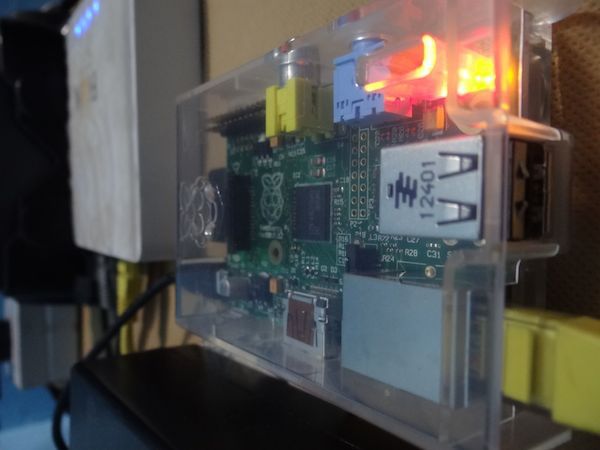
The blog stayed up at pi.vnykmshr.com as a parallel to the main site. A testbed for new features, a backup, and proof that the whole stack – Node.js, libgit2, nginx, the custom blog engine – could run on hardware that fits in your palm.